pyTRLCConverter.rst_converter
Converter to reStructuredText format.
Author: Gabryel Reyes (gabryel.reyes@newtec.de)
Classes
RstConverter provides functionality for converting to a reStructuredText format. |
Module Contents
- class pyTRLCConverter.rst_converter.RstConverter(args: Any)[source]
Bases:
pyTRLCConverter.base_converter.BaseConverter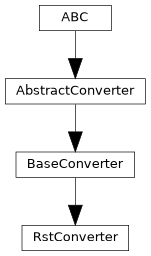
RstConverter provides functionality for converting to a reStructuredText format.
The converter builds a reStructuredText AST (RstDocument made of block elements) while walking the TRLC symbols and writes the output file(s) only once the document is complete (in leave_file() for multiple-document mode and in finish() for single-document mode).
- _convert_record_object(record: trlc.ast.Record_Object, level: int, translation: dict | None) pyTRLCConverter.ret.Ret[source]
Process the given record object.
- Parameters:
record (Record_Object) – The record object.
level (int) – The record level.
translation (Optional[dict]) – Translation dictionary for the record object. If None, no translation is applied.
- Returns:
Status
- Return type:
- _copy_external_files(dest_dir: str) None[source]
Copy all collected external files to the given destination directory.
- Parameters:
dest_dir (str) – Destination directory path.
- _create_rst_link_from_record_object_reference(record_reference: trlc.ast.Record_Reference) str[source]
Create a reStructuredText cross-reference from a record reference. It considers the file name, the package name, and the record name.
- Parameters:
record_reference (Record_Reference) – Record reference
- Returns:
reStructuredText cross-reference
- Return type:
str
- _file_name_trlc_to_rst(file_name_trlc: str) str[source]
Convert a TRLC file name to a reStructuredText file name.
- Parameters:
file_name_trlc (str) – TRLC file name
- Returns:
reStructuredText file name
- Return type:
str
- _get_rst_heading_level(level: int) int[source]
Get the reStructuredText heading level from the TRLC object level. Its mandatory to use this method to calculate the reStructuredText heading level. Otherwise in single document mode the top level heading will be wrong.
- Parameters:
level (int) – The TRLC object level.
- Returns:
reStructuredText heading level
- Return type:
int
- _get_trlc_ast_walker() pyTRLCConverter.trlc_helper.TrlcAstWalker[source]
If a record object contains a record reference, the record reference will be converted to a Markdown link. If a record object contains an array of record references, the array will be converted to a reStructuredText list of links. Otherwise the record object fields attribute values will be written to the reStructuredText table.
- Returns:
The TRLC AST walker.
- Return type:
- _on_implicit_null(_: trlc.ast.Implicit_Null) str[source]
Process the given implicit null value.
- Returns:
The implicit null value.
- Return type:
str
- _on_record_reference(record_reference: trlc.ast.Record_Reference) str[source]
Process the given record reference value and return a reStructuredText link.
- Parameters:
record_reference (Record_Reference) – The record reference value.
- Returns:
reStructuredText link to the record reference.
- Return type:
str
- _on_string_literal(string_literal: trlc.ast.String_Literal) str[source]
Process the given string literal value.
- Parameters:
string_literal (String_Literal) – The string literal value.
- Returns:
The string literal value.
- Return type:
str
- _other_dispatcher(expression: trlc.ast.Expression) str[source]
Dispatcher for all other expressions.
- Parameters:
expression (Expression) – The expression to process.
- Returns:
The processed expression.
- Return type:
str
- _render(package_name: str, type_name: str, attribute_name: str, attribute_value: str) str[source]
Render the attribute value depending on its format.
- Parameters:
package_name (str) – The package name.
type_name (str) – The type name.
attribute_name (str) – The attribute name.
attribute_value (str) – The attribute value.
- Returns:
The rendered attribute value.
- Return type:
str
- _write_document(file_name: str) pyTRLCConverter.ret.Ret[source]
Write the current reStructuredText document to the output file.
- Parameters:
file_name (str) – The output file name without path.
- Returns:
Status
- Return type:
- begin() pyTRLCConverter.ret.Ret[source]
Begin the conversion process.
- Returns:
Status
- Return type:
- convert_record_object_generic(record: trlc.ast.Record_Object, level: int, translation: dict | None) pyTRLCConverter.ret.Ret[source]
Process the given record object in a generic way.
The handler is called by the base converter if no specific handler is defined for the record type.
- Parameters:
record (Record_Object) – The record object.
level (int) – The record level.
translation (Optional[dict]) – Translation dictionary for the record object. If None, no translation is applied.
- Returns:
Status
- Return type:
- convert_section(section: str, level: int) pyTRLCConverter.ret.Ret[source]
Process the given section item. It will create a reStructuredText heading with the given section name and level.
- Parameters:
section (str) – The section name
level (int) – The section indentation level
- Returns:
Status
- Return type:
- enter_file(file_name: str) pyTRLCConverter.ret.Ret[source]
Enter a file.
- Parameters:
file_name (str) – File name
- Returns:
Status
- Return type:
- static get_description() str[source]
Return converter description.
- Returns:
Converter description
- Return type:
str
- static get_subcommand() str[source]
Return subcommand token for this converter.
- Returns:
Parser subcommand token
- Return type:
str
- leave_file(file_name: str) pyTRLCConverter.ret.Ret[source]
Leave a file.
- Parameters:
file_name (str) – File name
- Returns:
Status
- Return type:
- classmethod register(args_parser: Any) None[source]
Register converter specific argument parser.
- Parameters:
args_parser (Any) – Argument parser
- OUTPUT_FILE_NAME_DEFAULT = 'output.rst'
- TOP_LEVEL_DEFAULT = 'Specification'
- _ast_meta_data = None
- _base_level = 1
- _current_file_name = ''
- _document: pyTRLCConverter.rst.document.RstDocument | None = None
- _excluded_paths = []
- _external_files: list = []
- _out_path
- _plantuml_tmp_dir: tempfile.TemporaryDirectory | None = None