
SW Architecture
This file contains the software architecture for the pyTRLCConverter tool.
pyTRLCConverter is a command-line tool to convert TRLC files to different output formats, e.g. Markdown, reStructuredText or docx.
A main challenge for pyTRLCConverter is the conversion of project-specific TRLC types. TRLC is a framework that gets adapted to
project needs using “rsl” files. These files define TRLC types through derivations similar to classes in OOP.
PyTRLCConverter uses built-in converter classes that convert to destination formats using a generic attribute:value style
result. These built-in converter can be extended in an object-oriented manner to understand user defined types.
The following table gives an overview of the supported output formats:
Format |
Subcommand |
GFM Support |
|---|---|---|
Markdown |
|
yes |
reStructuredText |
|
yes |
docx |
|
yes |
ReqIF |
|
yes |
The following picture shows the overall tool flow:
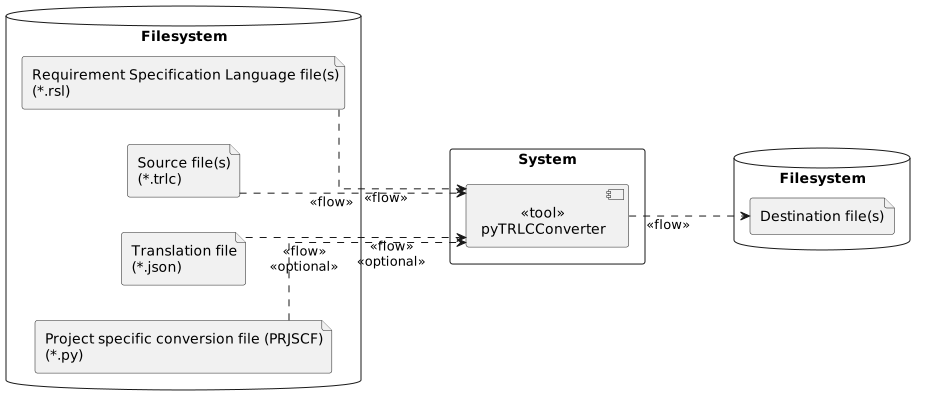
pyTRLCConverter Tool Flow
General
sw_arch_python_python
Attribute Name |
Attribute Value |
|---|---|
Description |
The pyTRLCConverter tool is implemented using Python v3.10 or higher and additional libraries available for Windows and Linux operating systems. |
Note |
N/A |
Satisfies |
|
Verification Criteria |
CI testing on Linux and Windows hosts. |
sw_arch_python_style
Attribute Name |
Attribute Value |
|---|---|
Description |
The pyTRLCConverter Python implementation files follow the PEP8 coding standard. Check code using |
Note |
N/A |
Satisfies |
|
Verification Criteria |
CI check using pylint on Linux and Windows hosts. |
sw_arch_cli_tool
Attribute Name |
Attribute Value |
|---|---|
Description |
The pyTRLCConverter tool is a command line application driven by arguments. |
Note |
N/A |
Satisfies |
|
Verification Criteria |
Call the tool using the `pyTRLCConverter` frontend. Check console output. |
sw_arch_error_msgs
Attribute Name |
Attribute Value |
|---|---|
Description |
The pyTRLCConverter tool writes informal messages to stdout and error messages to stderr. |
Note |
N/A |
Satisfies |
|
Verification Criteria |
Call the tool using the `pyTRLCConverter` frontend with legal and wrong arguments. Check console output. |
Static View
The following diagram shows the static architecture of the tool. It contains the components (Python modules) and their relations.
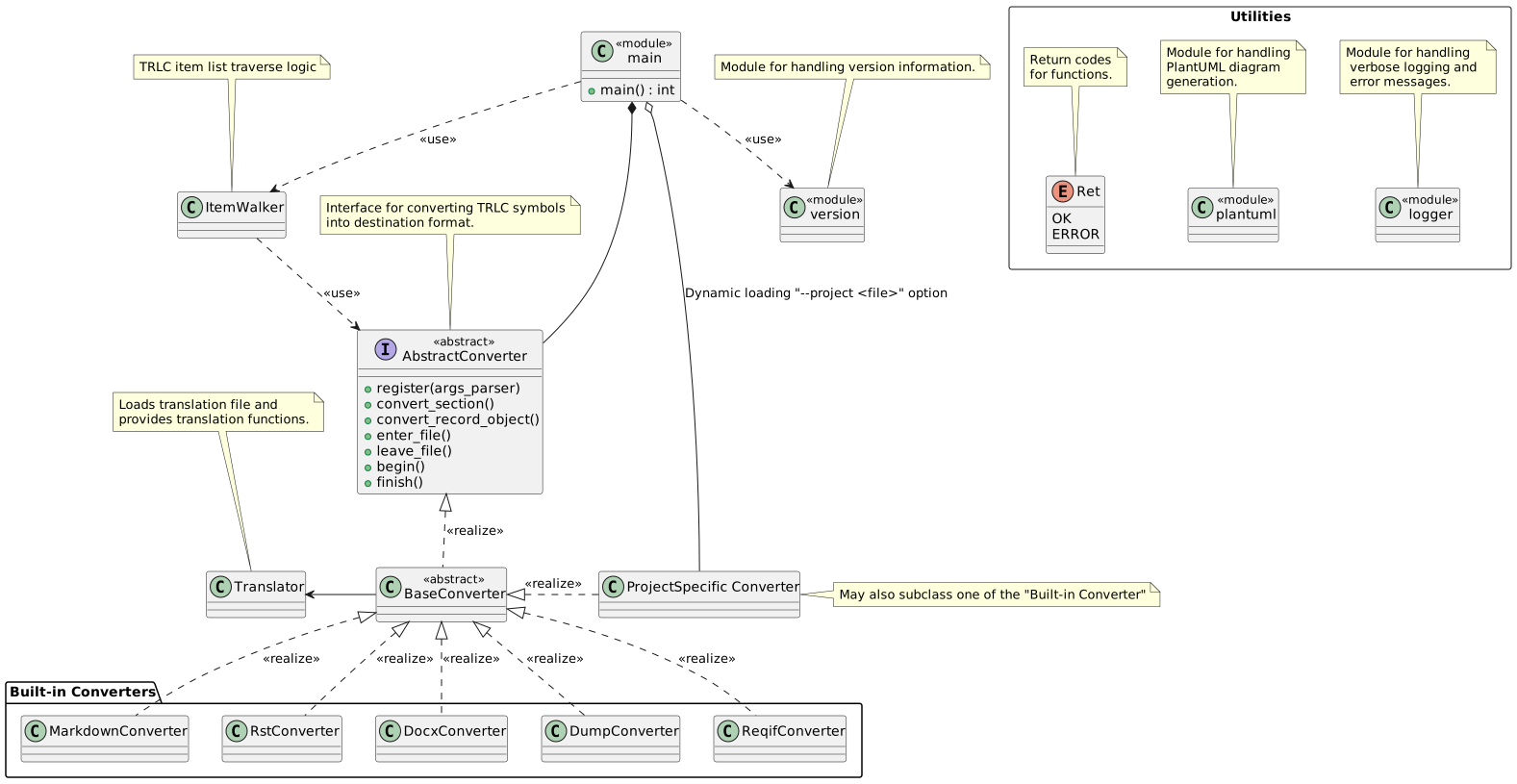
Static Architecture view
Dynamic View
The following diagram shows the pyTRLCConverter runtime view using a sequence_diagram. There are 4 main phases:
Processing of command-line arguments.
Loading of converter classes.
Loading of all TRLC files.
Traversing and conversion of TRLC sections and records.
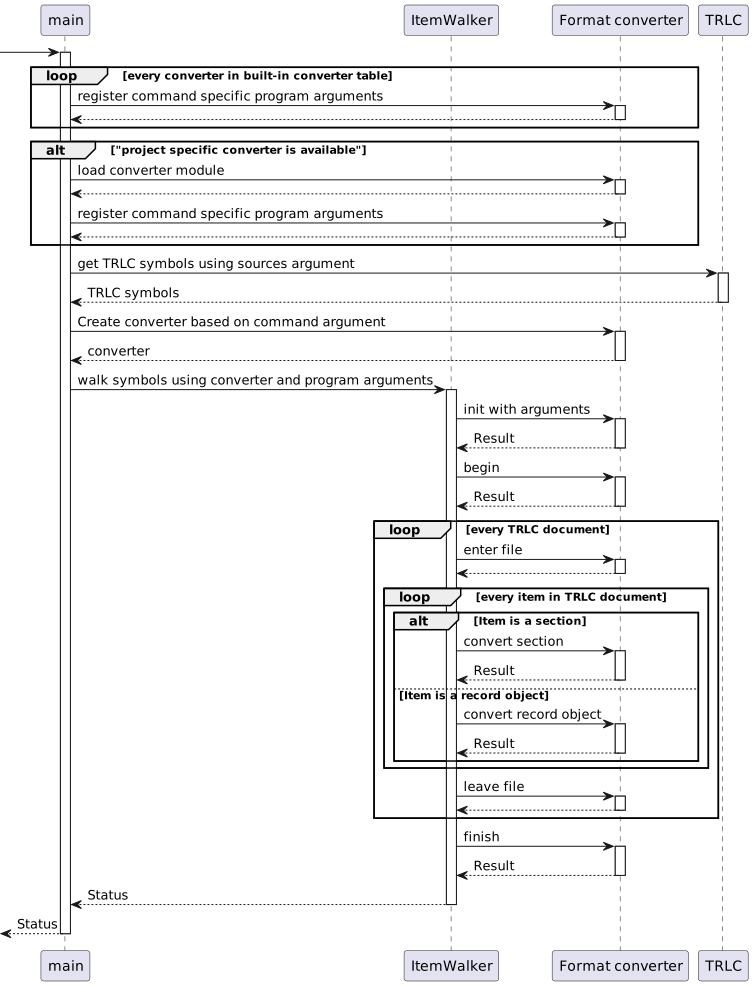
Dynamic Architecture View
Concepts
This sections explains the major concepts used in pyTRLCConverter.
Converter Derivation Concept
pyTRLCConverter uses a multilevel class hierarchy for providing different output formats and user defined type conversions. Only the ProjectConverter derivation level must be provided by a project using pyTRLCConverter. The upper base class levels are part of pyTRLCConverter.
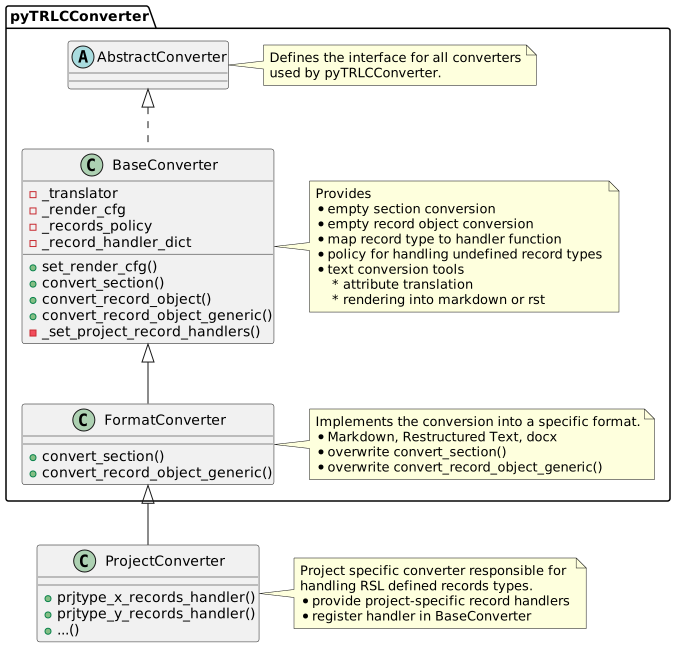
Class Diagram Derivation Concept
Text Formatting
Attribute Translation
TRLC attributes are key/value pairs inside a TRLC type, but not necessarily nice for documentation. The pyTRLCConverter converters provide a translation concept to map attribute names defined in a json translation file. It is a dictionary of type names. Each entry is another dictionary to map the attribute names of this type to the displayed text.
Example for a type “SwReg”:
{
    "SwReq": {
        "description": "Description",
        "valid_status": "Valid Status",
        "verification_criteria": "Verification Criteria",
    }

}
Text Rendering
pyTRLCConverter can render text attributes from Markdown into the destination format. A render configuration file is used to define which attributes contain Markdown formatting. This is another json file. The matching is done using regular expressions. The first matching entry in the render configuration list is used.
Example: Define the attribute description for type SwArchSpec in any package to be in Markdown.
{
   "renderCfg":
   [
       {
           "package": ".*",
           "type": "SwArchSpec",
           "attribute": "description",
           "format": "md"
       }
   ]
}
Components
This sections shows details of the major components of pyTRLCConverter.
main
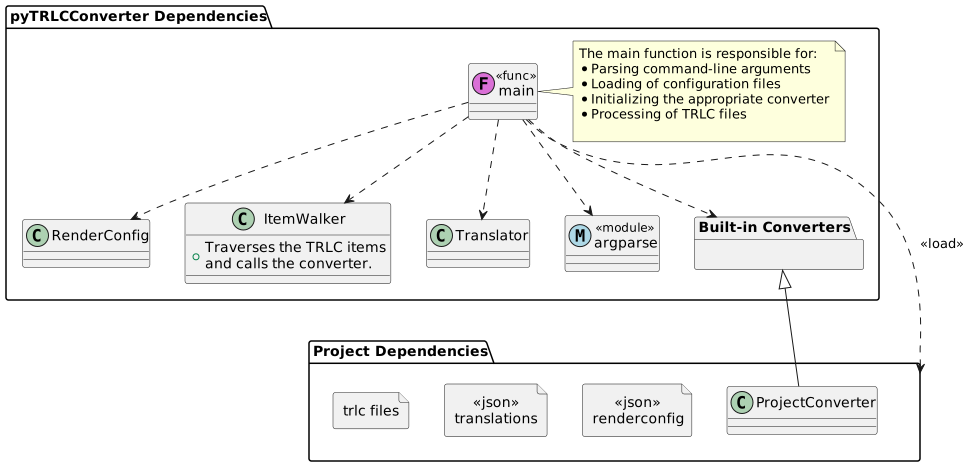
Internal Functions and Dependencies in __main__.py
sw_arch_component_main
Attribute Name |
Attribute Value |
|---|---|
Description |
The main component is the application entry point. It handles argument handling, help printing, usage error handling and version printing. Embedded Blocks:
|
Note |
N/A |
Satisfies |
|
Verification Criteria |
Call the tool using the `pyTRLCConverter` frontend with supported and unsupported arguments. Check console output. |
ItemWalker
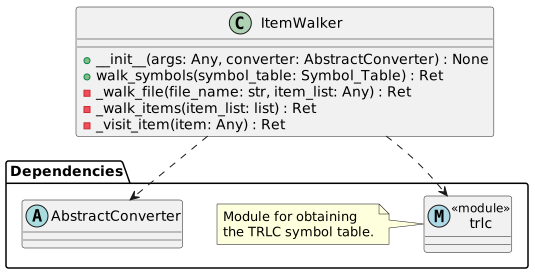
Class Diagram for ItemWalker
sw_arch_component_itemwalker
Attribute Name |
Attribute Value |
|---|---|
Description |
The ItemWalker class is responsible for traversing the TRLC symbol table, which holds all TRLC elements. The selected converter is then applied to all of the elements.
|
Note |
N/A |
Satisfies |
|
Verification Criteria |
Call the tool using the `pyTRLCConverter` frontend with dump converter and compare against a reference. |
Base Converter
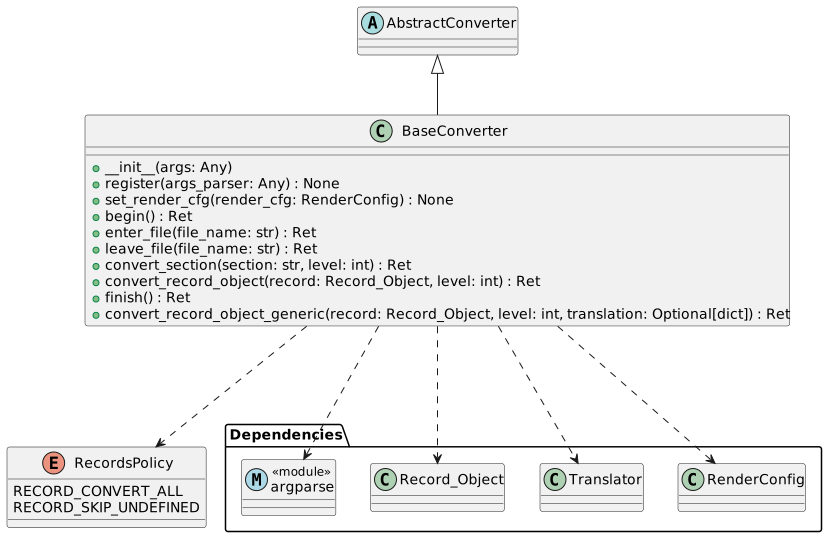
Class Diagram for BaseConverter
sw_arch_component_base_converter
Attribute Name |
Attribute Value |
|---|---|
Description |
The base converter implements the abstract converter API with logic that is common between all format specific converter implementations.
|
Note |
N/A |
Satisfies |
|
Verification Criteria |
Call the tool using the `pyTRLCConverter` with Dump Converter and both render and translation configurations. |
Dump Converter
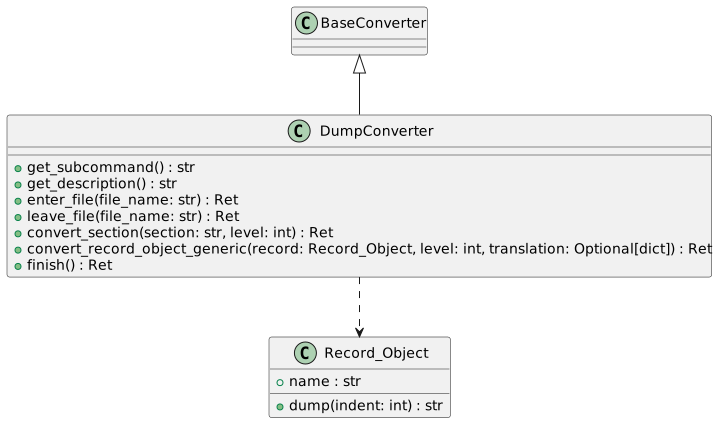
Class Diagram for Dump-Converter
sw_arch_component_dump_converter
Attribute Name |
Attribute Value |
|---|---|
Description |
The Dump Converter implements the Text output conversion.
|
Note |
N/A |
Satisfies |
|
Verification Criteria |
Call the tool using the `pyTRLCConverter` frontend with dump output format. |
Markdown Converter
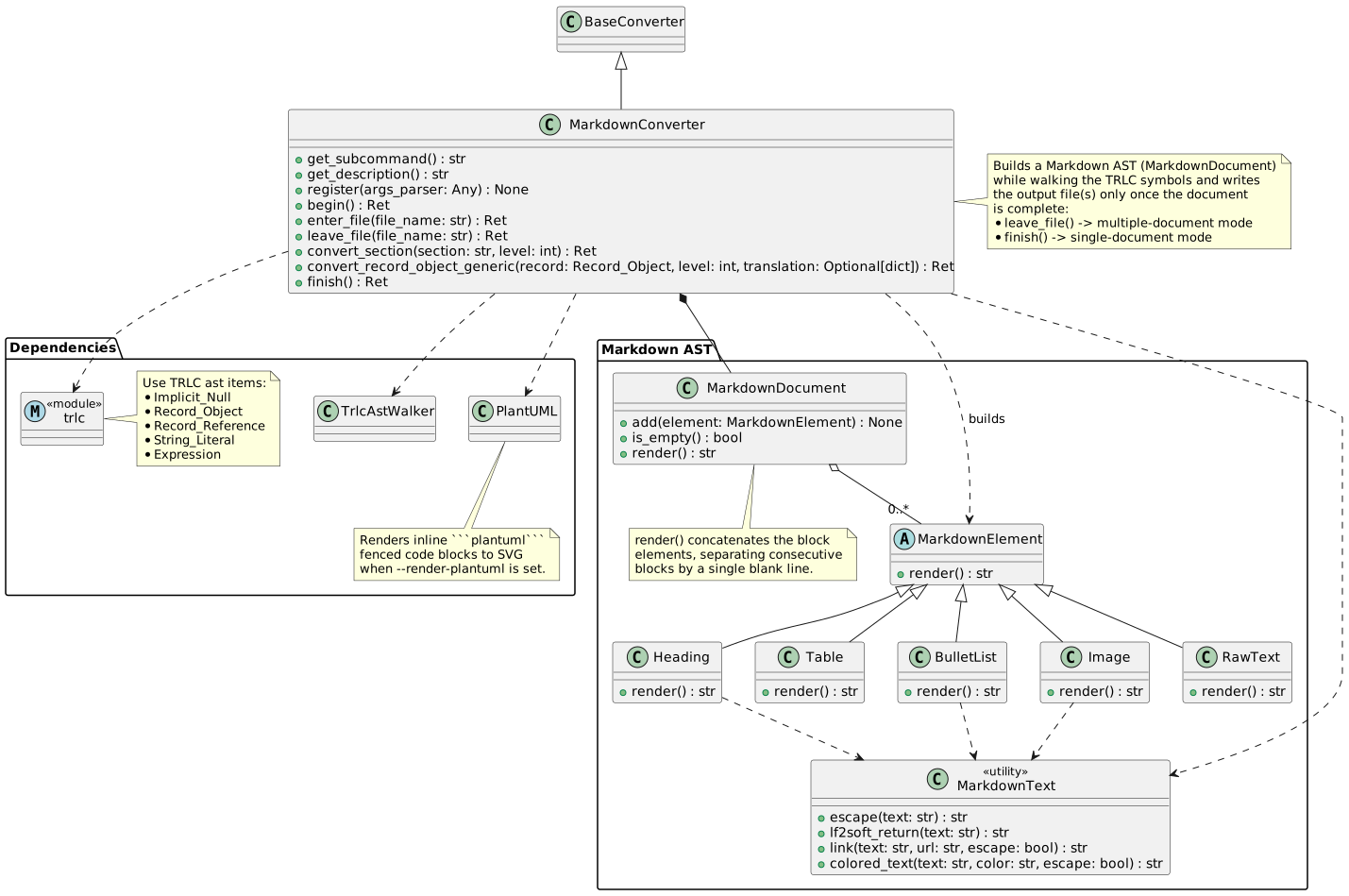
Class Diagram for Markdown-Converter
sw_arch_component_markdown_converter
Attribute Name |
Attribute Value |
|---|---|
Description |
The Markdown Converter implements the Markdown output format conversion.
|
Note |
N/A |
Satisfies |
|
Verification Criteria |
Call the tool using the `pyTRLCConverter` frontend with markdown output format. |
ReStructuredText Converter
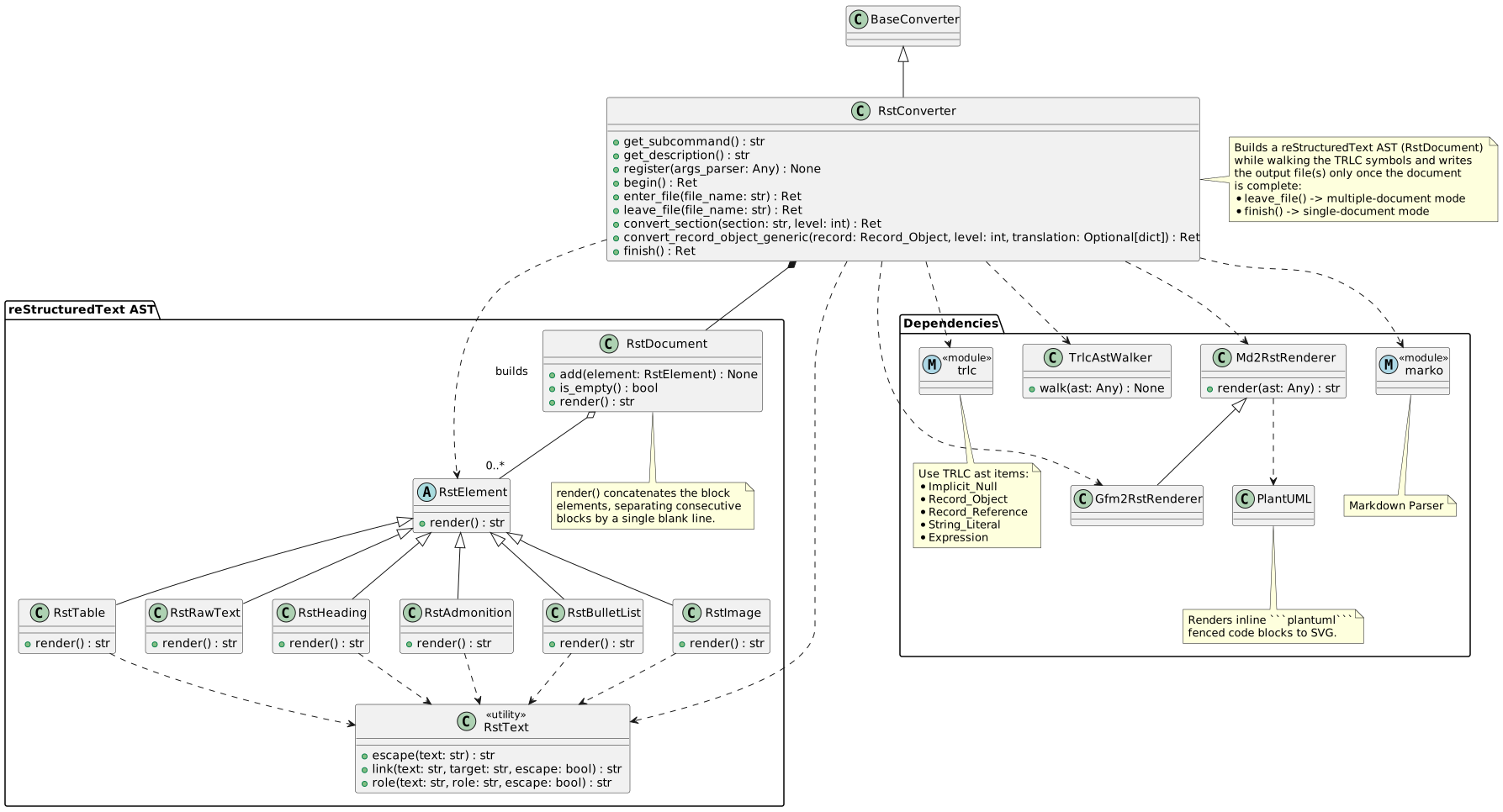
Class Diagram for ReStructuredText-Converter
sw_arch_component_rst_converter
Attribute Name |
Attribute Value |
|---|---|
Description |
The ReStructuredText Converter implements the ReStructuredText format output conversion.
|
Note |
N/A |
Satisfies |
|
Verification Criteria |
Call the tool using the `pyTRLCConverter` frontend with rst output format. |
ReqIF Converter
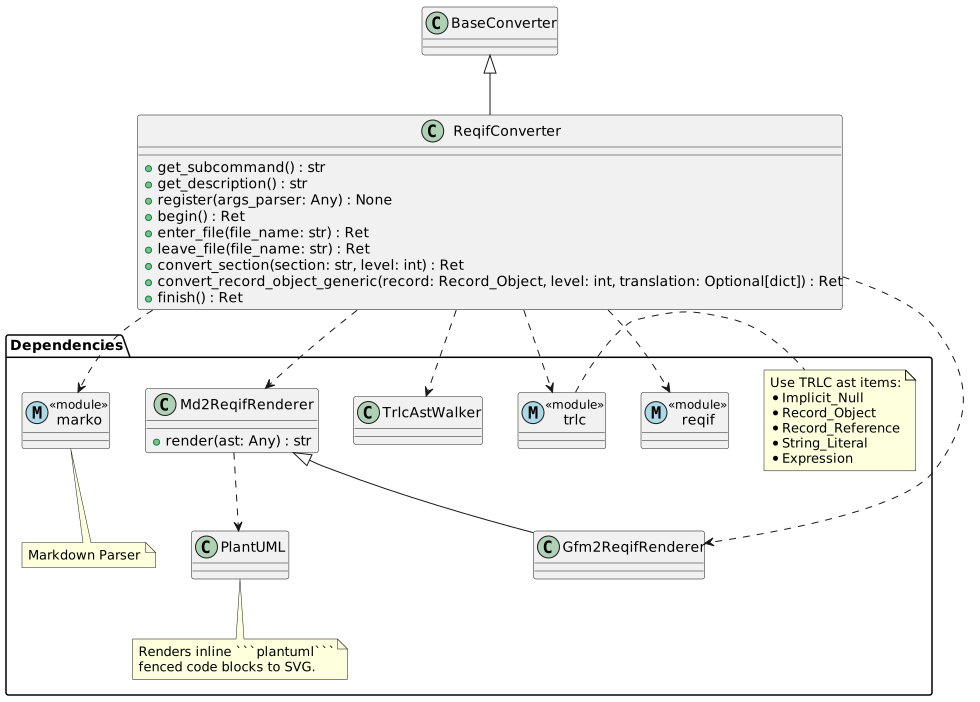
Class Diagram for ReqIF-Converter
sw_arch_component_reqif_converter
Attribute Name |
Attribute Value |
|---|---|
Description |
The ReqIF Converter implements the ReqIF output format conversion.
|
Note |
N/A |
Satisfies |
|
Verification Criteria |
Call the tool using the `pyTRLCConverter` frontend with reqif output format. |
DocX Converter
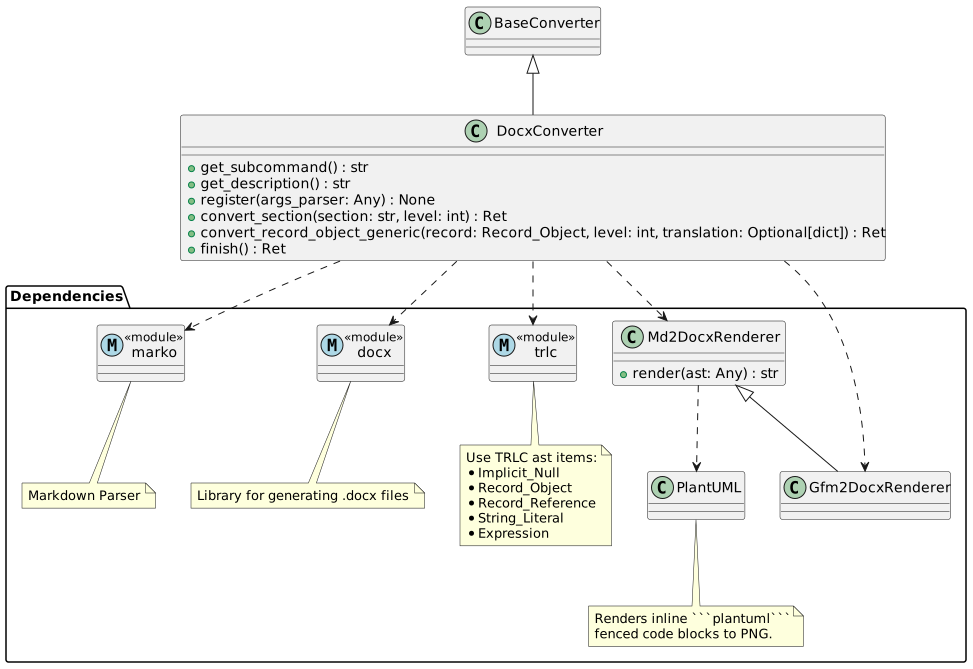
Class Diagram for DocX-Converter
sw_arch_component_docx_converter
Attribute Name |
Attribute Value |
|---|---|
Description |
The DocX Converter implements the DocX format output conversion.
|
Note |
N/A |
Satisfies |
|
Verification Criteria |
Call the tool using the `pyTRLCConverter` frontend with docx output format. |
Version Information
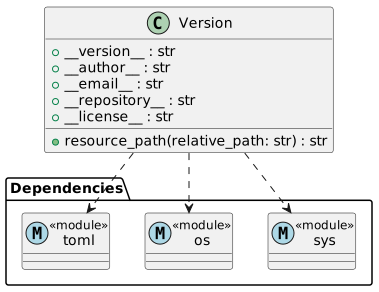
Class Diagram for Version
sw_arch_component_version
Attribute Name |
Attribute Value |
|---|---|
Description |
The version component handles version and other program attributes. |
Note |
N/A |
Satisfies |
|
Verification Criteria |
Call the tool using the `pyTRLCConverter` frontend with --version to see version information. |
Logger
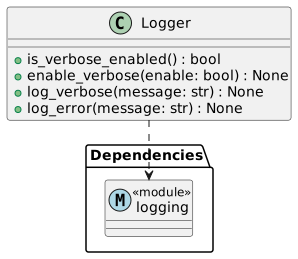
Class Diagram for Logging
sw_arch_component_logging
Attribute Name |
Attribute Value |
|---|---|
Description |
The Logger component provides a wrapper for Python logging to handle verbose and normal logging. |
Note |
N/A |
Satisfies |
|
Verification Criteria |
Call the tool using the `pyTRLCConverter` frontend with and without --verbose. |
PlantUML
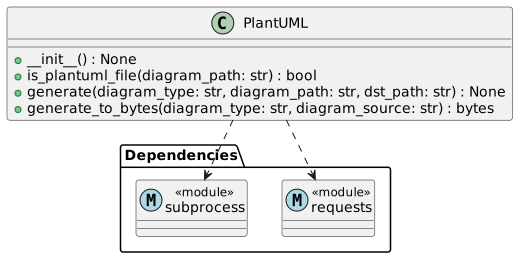
Class Diagram for PlantUML
sw_arch_component_plantuml
Attribute Name |
Attribute Value |
|---|---|
Description |
The PlantIML component provides diagram image generation based on PlantUML files. |
Note |
N/A |
Satisfies |
|
Verification Criteria |
Convert TRLC files with PlantUML items to markdown, rst and docx. |